


CR Mobile App
4.285.00 Reviews
App Specs
- Version
- 26.8.1
- Updated On
- License
- Free
- Downloads
- 50,000+
- Developer
- CentralReach, LLC.
- Categories
- Medical
- Platform
- Android
Screenshots
 Analysis by AppCompare
CR Mobile App is a medical app from CentralReach, LLC. that is aimed at people involved in applied behavior analysis care rather than casual health tracking. I approached it as a practical work tool: something that should help care-related tasks stay organized while a user is moving between appointments, notes, and day-to-day responsibilities. That focus makes it very different from a general wellness app, and it also changes what I look for. Speed matters, but so do account boundaries, careful handling of sensitive information, and clear user choices.
The app is free to download, carries an Everyone age rating, and has reached over 50 thousand installs. Its average rating is 4.2 from more than 250 ratings, which suggests a generally positive reception without making it look universally loved. I think that is a fair starting point: CR Mobile App can be useful in the right professional setting, but it is not the kind of medical application I would recommend simply because it is free or because it has a respectable score.
Where CR Mobile App fits in ABA care
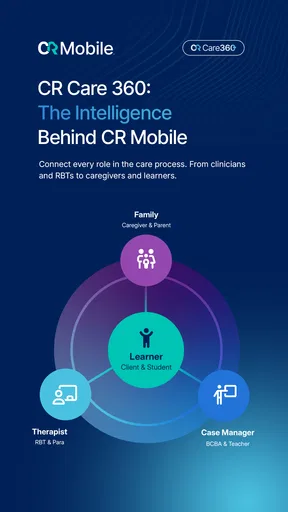
The most important thing to understand is that this is not a replacement for a full clinical record system, a patient portal, or a general appointment calendar. Its purpose is tied to ABA care, so its value depends heavily on how a person’s workplace or care team already operates. If your organization uses CentralReach as part of its workflow, a mobile companion can make more sense than forcing every task through a desktop browser.
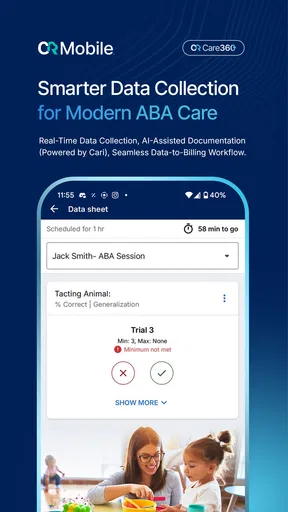
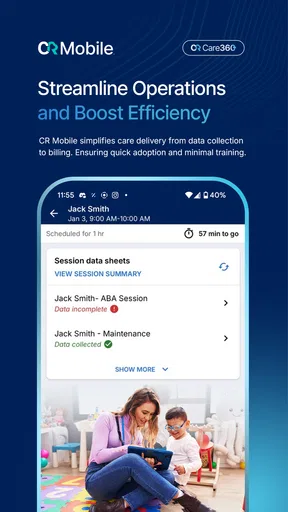
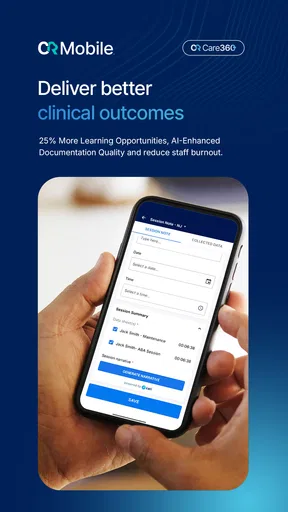
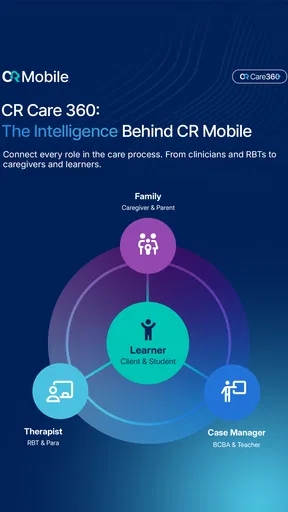
I would particularly consider it for a therapist, technician, supervisor, or other care professional who needs access to work-related tasks away from a desk. A phone is easier to carry into a session than a laptop, and a mobile interface can reduce the temptation to postpone routine documentation until the end of a busy day. That does not automatically make the work better, but it can make the timing more realistic.
For a parent looking for a standalone tool to monitor a child’s behavior, this is probably not the first app I would choose. The app’s identity is professional and service-oriented, not a simple family journal. A caregiver may benefit only when invited into an established CentralReach-based arrangement. Without that connection, the app is unlikely to provide the independent experience that a household expects from a consumer medical app.
That distinction also affects trust. In a clinical setting, the app is part of a larger chain of responsibility. The person using the phone is not necessarily the person who defines the care plan, approves access, or decides which information should be visible. I therefore judge it less as a personal productivity app and more as one screen in a controlled care workflow.
My first impression of the mobile approach
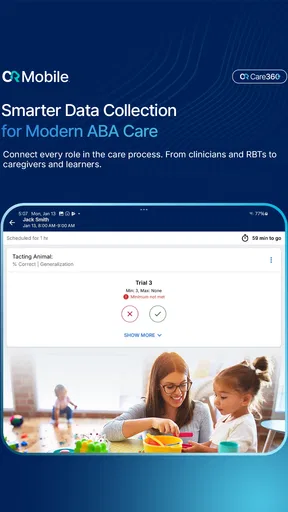
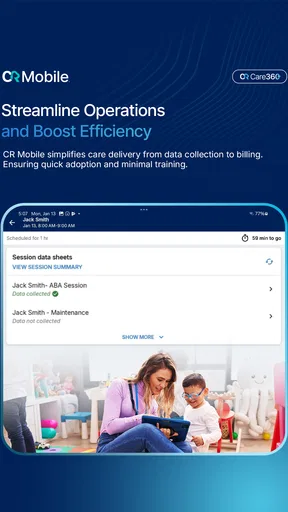
The mobile format is most convincing when it supports short, focused actions. A clinician or technician may need to check what is relevant for the next part of a session, record information while details are fresh, or review work before moving on. These are moments where a phone can be more practical than a desktop computer.
Worth Reading Before You Choose

EA SPORTS FC Mobile 26 Is a Bigger Football Game, but It Takes Time

Flipboard Shows What News Apps Must Do Beyond the Feed

Switching to Android Auto Means Rethinking Your Driving Routine

Google Calendar Makes a Crowded Week Easier to Manage

Ludo King Makes the Most of the Minutes Between Plans

Baby Panda World Brings Quick Play to Modern Phones, but Its Game Library Feels Busy
The trade-off is that phones are also distracting and cramped. Long forms, detailed review, and careful correction are usually easier on a larger screen. I would not treat the mobile app as the ideal place for every part of a clinical workflow. My practical advice is to use it for the work that benefits from mobility, then reserve a larger device for anything that requires extended reading or precise editing when that option is available in your organization.
That division of labor is one of the less obvious ways to get more from the app. Instead of asking whether it can replace a desktop system, ask which steps become safer or faster when they happen immediately on a phone. The answer will vary by role, but the question prevents unrealistic expectations.
Trust begins with the account, not the interface
Because ABA care involves sensitive personal information, I would pay close attention to how an account is created, who provides access, and what happens when a role changes. The developer is CentralReach, LLC., and the app is designed for a professional care environment. That makes organizational account management more important than the usual question of whether an app has a convenient sign-in screen.
Before using it for real work, I would confirm which account credentials are expected, whether access is supplied by an employer or care organization, and how a lost or replaced phone should be handled. I would also ask who to contact if an account remains active after a person leaves a team. These are not glamorous details, but they are exactly where user control can break down in medical software.
I would avoid sharing a work account with another person, even if that seems convenient during a busy shift. Shared credentials weaken accountability and make it harder to tell who viewed or entered information. A mobile app should support an individual’s assigned access, not become a shortcut around the organization’s access rules.
It is also sensible to separate personal and professional use on the same phone. Keep the device protected with its normal lock, avoid leaving the app open in public, and be careful when notifications appear where someone else can read them. These habits are not special features of CR Mobile App, but they matter more here than they would in a simple habit tracker because the context is medical care.
Visible choices matter more than reassuring language
When I evaluate a medical app, I do not rely on broad claims about security or privacy. I look for concrete choices the user can understand: how to sign out, how to control access, whether notifications can expose sensitive details, and whether the app makes it obvious which account is active. Those checks are especially important on a shared phone or a device used across several work locations.
I would review the app’s current permission prompts and privacy information directly before putting it into regular use. Permissions can change with updates, phone settings, or organizational configuration, so this is not something I would assume from the app’s category. If a prompt appears unrelated to the task at hand, I would pause and ask the organization’s administrator why it is needed rather than approving everything automatically.
The same cautious approach applies to sign-in persistence. Staying signed in can save time, but it may not be appropriate on a device that other people can unlock. If the phone belongs to a clinic or is passed between staff, I would want a clear local policy for locking, signing out, and removing access when the device changes hands.
This is where CR Mobile App should be judged differently from a consumer app. A small convenience can carry a much larger consequence when the screen is connected to care records. I prefer a slightly slower workflow that makes the active account and access state clear over a faster one that encourages careless sharing.
Sensitive moments in everyday use
A realistic scenario might look like this: I arrive for a scheduled ABA session with a phone in my pocket, check the work context I need, and record information soon after the relevant event rather than relying on memory hours later. The benefit is not just speed. Immediate entry can reduce the risk of mixing details from separate sessions or forgetting why a note was made.
However, I would not enter sensitive information while standing in a crowded hallway, on public transport, or around people who are not part of the care team. A mobile workflow makes documentation possible in more places, but that does not mean every place is suitable. The app can improve timing while the user still has to choose an appropriate environment.
I would also be careful with the phone’s keyboard, screen previews, and automatic backups. A user may think only about the app itself and forget that text can appear in recent-app views, notifications, or other parts of the operating system. The safest routine is to keep entries factual and necessary, avoid copying sensitive details into unrelated apps, and check what appears on the lock screen.
Another practical issue is connectivity. Mobile work often happens away from a desk, sometimes in places where reception is unreliable. I would not assume that an entry has been saved merely because I tapped a button. After recording something important, I would look for a clear confirmation and follow the organization’s procedure if the connection fails. If the workflow does not clearly show whether information was submitted, that uncertainty is a genuine reason to slow down and verify it later.
This is also why I would avoid treating the app as a private scratchpad. Clinical notes should not be drafted casually and left in an uncertain state. If I needed to make a temporary reminder, I would use an approved method and transfer it properly, then remove the temporary copy according to workplace rules.
What user agency looks like in practice
User agency is not only the ability to tap through a form. It includes knowing what can be changed, what is controlled by an administrator, and what to do when something looks wrong. In a professional CentralReach environment, some options may be determined by the care organization rather than the individual app user. That can be appropriate, but it should be explained clearly.
If I saw information that belonged to the wrong client, a task that did not match my role, or an unexpected change in access, I would stop and report it instead of trying to work around the screen. A mobile app should not encourage improvisation when the underlying information is sensitive. The correct response to a permissions or account problem is escalation through the responsible organization.
I would also ask how corrections are handled. Any system used for care documentation needs a trustworthy way to fix mistakes without hiding the original context or creating duplicate records. If the mobile experience makes correction unclear, I would use the approved desktop or administrative route rather than repeatedly editing until the result looks right.
One useful habit is to review the app at the beginning of a work period: confirm the correct account, check that the expected work context is present, and make sure the phone itself is protected. This takes little time and catches problems before information is entered. It is a better safeguard than discovering at the end of a session that the wrong profile was active.
How it compares with familiar alternatives
Compared with paper notes, a dedicated mobile workflow can reduce loose sheets, delayed transcription, and illegible handwriting. The advantage is strongest when the organization already has a defined digital process. Paper may still feel more flexible in an emergency or during a connectivity problem, but it creates its own storage and transfer risks.
Compared with a general notes app, CR Mobile App is the more sensible choice for work that belongs inside a structured ABA care system. A notes app may be quicker for personal reminders, yet it lacks the same professional context and can tempt users to store sensitive material in the wrong place. I would never use a generic note-taking tool as a substitute for an approved clinical workflow.
Compared with a full desktop platform, the mobile app should win on portability and immediate access, not on screen space. Detailed review, broad planning, and administrative work are usually more comfortable on a computer. The best arrangement is often complementary: mobile for timely, location-sensitive tasks and desktop for deeper review.
Compared with a consumer symptom tracker, this app is less appealing for someone who simply wants to record personal health observations. Its value comes from its connection to ABA care responsibilities, not from being a universal medical diary. Choosing it for the wrong audience would create friction rather than solve a problem.
Who should use it, and who should look elsewhere
I would recommend considering CR Mobile App if you are part of an ABA care team that already works with CentralReach, your organization has explained the access process, and you need a practical mobile route for assigned tasks. It is especially promising for professionals who lose time by postponing routine work until they return to a computer.
I would be more cautious if you are a family member searching for an independent behavior-tracking app, a student without an authorized organizational account, or a professional whose employer uses a different record system. In those situations, the app may not fit your workflow, even though it is free and available to a broad age audience.
I would also skip it as a personal medical journal. The professional setting is central to its identity, and using a specialist tool without the surrounding account structure can be confusing. A simpler private tracker may be more appropriate for personal observations, provided it is suitable for the information being recorded.
Version, support expectations, and daily discipline
The current version is 26.8.1, and the app requires Android 9 or later. That makes device compatibility an important first check, especially for organizations managing older phones. I would update through the normal trusted app channel, then verify that sign-in, account context, and the most important workflow still behave as expected before using the app during a demanding session.
An update is not only a technical event in a medical workflow. It can change screens, prompts, or the way a task is completed. I would avoid installing an update for the first time immediately before a critical appointment. A short test afterward can reveal whether staff need new instructions or whether a device needs attention.
For troubleshooting, I would start with the organization’s designated support route rather than trying random workarounds. A local administrator may understand account roles and workflow settings better than a general phone repair shop. If the issue concerns access to sensitive information, documenting the problem and reporting it promptly is more responsible than repeatedly reinstalling the app.
My own routine would be simple: protect the phone, use only the assigned account, verify the active context, enter information in an appropriate place, confirm successful submission, and sign out or lock the device when the situation requires it. Those steps make the app safer to use without pretending that software alone can manage every risk.
My cautious verdict
CR Mobile App makes sense as a focused mobile companion for ABA care, especially when it is part of an established CentralReach workflow. I like the basic idea of bringing professional tasks closer to the moment they happen, because delayed documentation can be inconvenient and less reliable. The free price and Everyone rating make it easy to consider, while the overall rating of 4.2 indicates that many users find value in it.
Still, I would not choose it on ratings alone. The real question is whether your organization has set up the right account, explained responsibilities, and provided a clear process for privacy, corrections, support, and device changes. Those surrounding controls matter as much as the mobile interface.
My recommendation is conditional but positive: use it when your ABA provider or care organization expects it and has given you a defined workflow. Treat the phone as a controlled professional device, not a casual place to leave medical information. If you need a standalone personal tracker or a general health app, choose something designed for that purpose instead.
In the right hands, this app can make mobile care work more practical. Its strongest quality is not that it tries to do everything; it is that it serves a specific professional context. That narrow focus is also its main limitation, so I would recommend it to the people who genuinely belong in that context and advise everyone else to look for a simpler, more suitable alternative.
Pros
- Fast access to credit card balances
- transactions
- and payment details.
- Push notifications can help track purchases and upcoming payment dates.
- Secure login options may include biometric authentication on supported devices.
- Digital statements reduce paper use and are easy to review on the go.
- Useful tools for managing multiple CR financial products in one place.
Cons
- Some features may require an eligible CR account or registered card.
- App performance can vary depending on device model and connection quality.
- Certain transactions or updates may take time to appear in the account.
- Customer support options inside the app may be limited compared with phone service.
- Users may need to update the app regularly to maintain security and compatibility.
FAQs for CR Mobile App
What is the CR Mobile App used for?
CR Mobile App is designed to give users convenient access to CR-related services and information from a mobile device. Depending on the organization or service connected to the app, you may be able to view account details, manage requests, receive notifications, check updates, or access digital resources. The exact tools available can vary by region, account type, and the version installed.
Is CR Mobile App free to download and use?
The CR Mobile App can generally be downloaded from the official Android or iOS store without an upfront charge. However, some services accessed through the app may require an existing subscription, registered account, membership, or payment. Mobile data charges may also apply when using the app away from Wi-Fi. Before downloading, check the store listing and the provider’s terms for current pricing and eligibility details.
Do I need an account to use CR Mobile App?
Many of the app’s personalized features require users to sign in with a registered CR account. An account may be necessary to view private information, submit requests, synchronize preferences, or receive service-specific notifications. Some general content may be available without logging in, but access can be limited. If registration is supported, use accurate information and protect your login credentials.
Is CR Mobile App safe and available on Android and iPhone?
CR Mobile App should be downloaded only from its official Google Play Store or Apple App Store listing to reduce the risk of installing an altered or unsafe version. Before installation, review the developer name, permissions, privacy information, ratings, and recent update date. Compatibility depends on your device and operating-system version, so older phones may not support every feature.
What should I do if CR Mobile App is not working correctly?
If CR Mobile App freezes, fails to open, or does not display current information, first check your internet connection and confirm that the app is updated. Restarting the app or device can also resolve temporary issues. If problems continue, review the provider’s support options, check whether the service is experiencing an outage, and avoid repeatedly entering login details if authentication errors are appearing.


